Lets Build A Plex Server......That Does Offer Stuff As Well
Comments
-
SHWEET!
Actually, i just talked to the IT kid in our office about an hour ago on this very subject. He told me he'd take care of me by making a boot thumb drive.
I love go-getters!
Yup.I started to assemble last night, against my better judgement (2.5yo daughter still awake and pregnant wife cooking dinner) which was short lived. Tonight is a no go after testing the waters last night which means that, like my original plan, it looks like a friday night/saturday build. Booo!
To further this discussion, these M.2 drives from Samsung are getting rave reviews. Some say that going from SSD to M.2 isn't much of a noticeable increase at all but those going from a Platter to M.2 is earth shattering. Is it worth the premium since i already have an SSD ready to go?
So there is a chance I have some time for Halo on Saturday.... you gonna do that or build this stupid computer
PS your gonna love Plex... and I can explain why later
"....not everything that can be counted counts, and not everything that counts can be counted." William Bruce Cameron, Informal Sociology: A Casual Introduction to Sociological Thinking (1963) -
Hmm.....well, my wife will be going out to get her hair did, nails did, and someone is going to rub her down. That means that Daddy has to watch the little one. But, little one takes nap from 12:30-3. I'll be building it as soon as mommy walks out the door around 9am EST so i think we're golden!
IT kid just sent me an email that he doesnt have time. Guess i'm on my own...
I have a proposition PM coming your way...Where’s the KABOOM?!?! There’s supposed to be an Earth shattering KABOOM!!! -
Its really not difficult to make the USB install media. Just need a decent internet connection. Sometimes you have to turn off firewall/virus to get it to go. Its all done by the little Microsoft Media Creation Tool, download here: https://www.microsoft.com/en-us/software-download/windows10
For instructions, click on where it says "Using the media creation tool", then click "Perform clean installation using a USB or DVD" -
I'll most likely do it at work tomorrow morning as my home laptop sucks. I have a new 16GB thumb drive arriving this afternoon which was a whopping $6. With nobody on the work network at the time i arrive 6:45-7am, i should get the full bandwidth making the download pretty fast.Where’s the KABOOM?!?! There’s supposed to be an Earth shattering KABOOM!!!
-
Yeah the USB route is the easiest and doesn't waste a sata port. They even recommend it typically with FREENAS.Main Surround -
Epson 8350 Projector/ Elite Screens 120" / Pioneer Elite SC-35 / Sunfire Signature / Focal Chorus 716s / Focal Chorus CC / Polk MC80 / Polk PSW150 sub
Bedroom - Sharp Aquos 70" 650 / Pioneer SC-1222k / Polk RT-55 / Polk CS-250
Den - Rotel RSP-1068 / Threshold CAS-2 / Boston VR-M60 / BDP-05FD -
Yep, I'm totally done with installing on a DVD if I can help it. USB installs are so much faster (and quieter). You'll be amazed to see Win10 install done in something like 15 minutes.
-
Yep, I'm totally done with installing on a DVD if I can help it. USB installs are so much faster (and quieter). You'll be amazed to see Win10 install done in something like 15 minutes.
Yup, and they are easier to store too lol... I cant tell you the number of times I've had to use it to fix a corrupt OS file. The Windows Repair aspect of it is quite cool..."....not everything that can be counted counts, and not everything that counts can be counted." William Bruce Cameron, Informal Sociology: A Casual Introduction to Sociological Thinking (1963) -
Its really not difficult to make the USB install media. Just need a decent internet connection. Sometimes you have to turn off firewall/virus to get it to go. Its all done by the little Microsoft Media Creation Tool, download here: https://www.microsoft.com/en-us/software-download/windows10
For instructions, click on where it says "Using the media creation tool", then click "Perform clean installation using a USB or DVD"
So I decided to do this when I got home. I only had the options for Windows 10, Windows Home Single, and Windows N. I went with just "Windows 10". Was that correct?
60% left to go.Where’s the KABOOM?!?! There’s supposed to be an Earth shattering KABOOM!!! -
Its really not difficult to make the USB install media. Just need a decent internet connection. Sometimes you have to turn off firewall/virus to get it to go. Its all done by the little Microsoft Media Creation Tool, download here: https://www.microsoft.com/en-us/software-download/windows10
For instructions, click on where it says "Using the media creation tool", then click "Perform clean installation using a USB or DVD"
So I decided to do this when I got home. I only had the options for Windows 10, Windows Home Single, and Windows N. I went with just "Windows 10". Was that correct?
60% left to go.
Yes, Windows 10 was the correct choice. Hopefully done now and installing OS? -
It's on the USB drive now. I haven't put the computer together yet. That is this weekend's task. I SHOULD be able to do it an a couple hours tonight barring the friday night beers don't slow me down.Where’s the KABOOM?!?! There’s supposed to be an Earth shattering KABOOM!!!
-
If you haven't built an Intel LGA system yet, be VERY careful with the CPU socket. You bend those pins, you're screwed. Steady hand, no beers, leave the plastic cover on, open up, set down with care that it touches down flat (don't lead with one edge in first). Double check it is all aligned, then close the holder.
I attached a good guide from Asus (it says 1150, but 1151 technique will be the same)
-
Thanks Bill!
I've actually watched a couple of videos on recent builds just for that exact reason. Just wanted to freshen up and see if there were any new procedures that i didn't know about such as, the new temp dust cap that pops off once you've seated the cpu and lowered the clamp. (which is illustrated in your guide) Also noted that the CPU's are much more fragile this time around. As long as the arrow is still located in the bottom left, i feel comfortable with that.
I forgot to ask. SSD formatting. NTFS? Does Windows 10 decide this on it's own?Where’s the KABOOM?!?! There’s supposed to be an Earth shattering KABOOM!!! -
Windows install takes care of formatting. Nothing to worry there.
-
And here we go!

Where’s the KABOOM?!?! There’s supposed to be an Earth shattering KABOOM!!! -
"....not everything that can be counted counts, and not everything that counts can be counted." William Bruce Cameron, Informal Sociology: A Casual Introduction to Sociological Thinking (1963)
-
Over site #36. Anyone know of an adapter that goes in a drive bay that'll accept an SSD so it's not flowing?
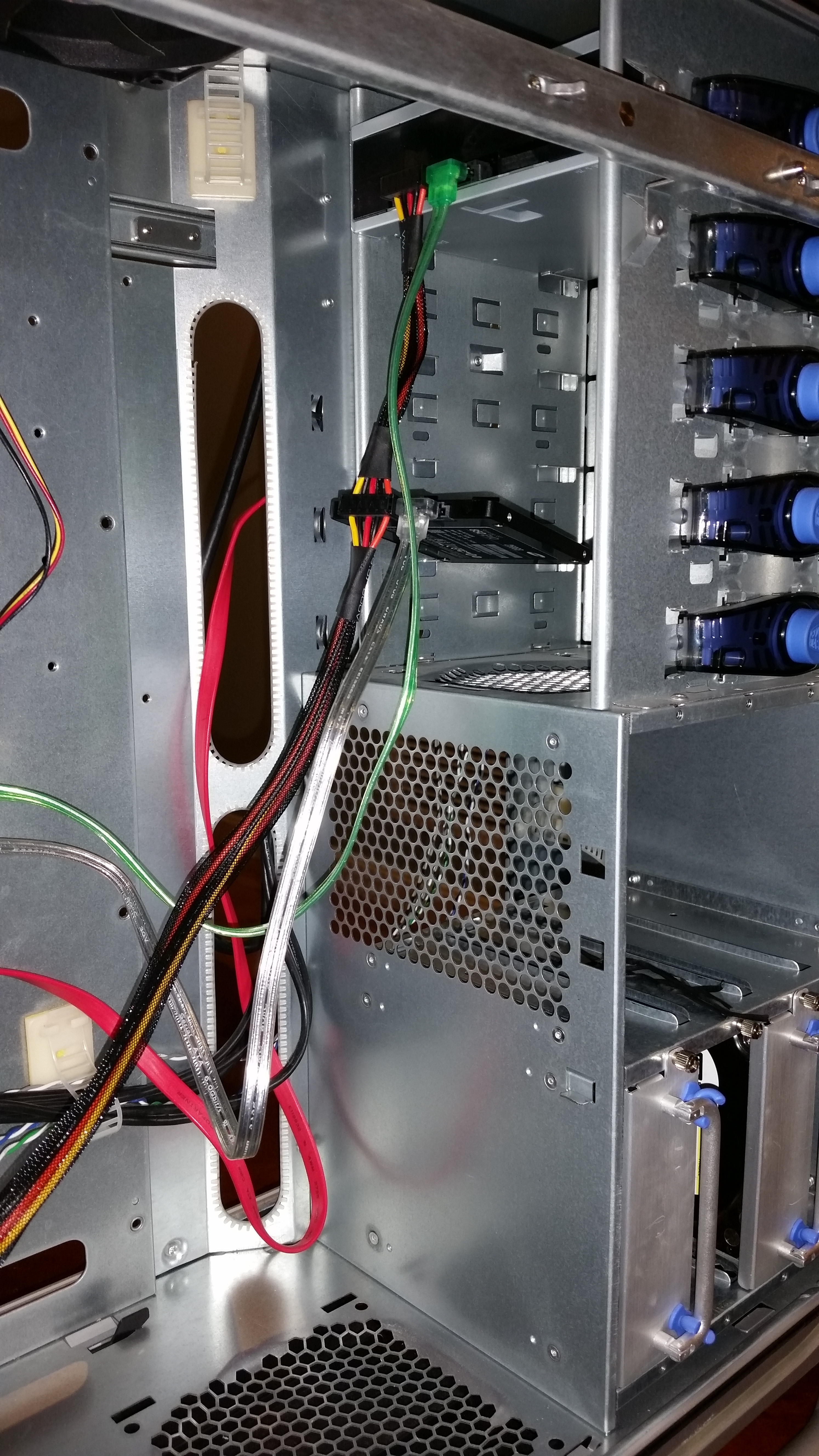
Where’s the KABOOM?!?! There’s supposed to be an Earth shattering KABOOM!!! -
By drive, I mean optical, not HDD.Where’s the KABOOM?!?! There’s supposed to be an Earth shattering KABOOM!!!
-
I'm confused. Are you asking about mounting an optical drive or the SSD? There are adapters at newegg for $10 or less that will hold a 2.5" disc and give mounting for a 3.5" disc. Not sure if they have one for 5.25" disk (optical size). This is where a newer case will be great. They usually have 2.5" mounts aplenty or ssd specific mounts (on the backside of MB or elsewhere. I don't worry too much about the SSD being mounted securely. If you can get one or two screws in, that's usually fine. Some people use velcro tape or zip ties. You can get creative. SSDs don't care if they are horizontal/vertical and you don't have to worry about airflow with them (they don't get hot).
-
Yeah, to clarify, I WAS looking for a 2.5 to 5.25 adapter. Ordered a $6 jobber an hour ago.
Been running stable for an hour but I really haven't done anything yet. Only hiccup I had on first power up was the case power cables were accidentally installed in the PWR LED slot instead of just PWR. Took a quick minute to troubleshoot. Where’s the KABOOM?!?! There’s supposed to be an Earth shattering KABOOM!!!
 -
Update!
I finally got around to ripping my first movie. Toy Story 1 as I want my daughter to see it. I started Makemkv and guessed my way through a trial run. 22minutes later, I have a full size DVD rip. Open the file and I have a bunch of trailers and junk. Easily deleted. Anyone want to make a quick tutorial?
I just receive the Force Awakened on blu/DVD/Digital. I got confused with this. There are 3 titles with the same file size. Which one to choose? Also, it appears my Makemkv expires in 6 days. Wth?!
Where’s the KABOOM?!?! There’s supposed to be an Earth shattering KABOOM!!! -
Update!
I finally got around to ripping my first movie. Toy Story 1 as I want my daughter to see it. I started Makemkv and guessed my way through a trial run. 22minutes later, I have a full size DVD rip. Open the file and I have a bunch of trailers and junk. Easily deleted. Anyone want to make a quick tutorial?
I just receive the Force Awakened on blu/DVD/Digital. I got confused with this. There are 3 titles with the same file size. Which one to choose? Also, it appears my Makemkv expires in 6 days. Wth?!
Just grad the one with the biggest file size, and th format you want.
Same with force awakens. If all same size pick one lol...
Make MKV does that, just google the new code, it's in perpetual beta meaning you have to enter a new code every couple months... No biggie
"....not everything that can be counted counts, and not everything that counts can be counted." William Bruce Cameron, Informal Sociology: A Casual Introduction to Sociological Thinking (1963) -
Alright, so if there are multiple files that are the same, only grab 1....got it.
When you selected the audio track, i only have a 5.1 with no intentions of going 7.1 but also want to have the stereo track for just casually watching a movie on a TV or a tablet. Do i selected both the stereo AND dts file or does that not work?
I haven't tried Handbrake yet which will be next. Just toying around right now.
I did notice that when i tried to sample The Force Awakens, it did stutter a bit when skipping around. I'm assuming it has something to do with the file size? I was in a hurry so maybe i was clicking too much....i'll revisit that later.
I'm waiting for the last possible minute to start ordering HDD's as i don't need it at this very second, and the longer i wait, the better the price. Haven't decided on which one to buy. WD Red or Black, Hitachi, Seagate? I've been a devout WD fan since i started tinkering and have never strayed from the brand. I have 9 WD drives in the house but if financially, it makes sense to buy something else, i will. I still have a Raptor running in an external that i purchased 11 years ago. Not to shabby...
I'd ask for a preference but i know it's like beer, everyone has their flavor. The reviews for HDD's are to be taken with a grain of salt. I don't review a product unless it is less than perfect and it's the same for HDD's. Everyone wants to write a review when they have a bad experience.Where’s the KABOOM?!?! There’s supposed to be an Earth shattering KABOOM!!! -
Thanks for the input Z!
I just selected them all and let it go. Took an hour for the 3 files but once i realized they were all the same, a quick delete resolved that error.
Thanks for the heads up on the MakeMKV forum. I'll check it out later today.
Now for movies that come with the DVD/Blu/Digital, is there any difference between the Blu and Digital? Or, just stick with ripping the Blu?Where’s the KABOOM?!?! There’s supposed to be an Earth shattering KABOOM!!! -
Thanks for the input Z!
I just selected them all and let it go. Took an hour for the 3 files but once i realized they were all the same, a quick delete resolved that error.
Thanks for the heads up on the MakeMKV forum. I'll check it out later today.
Now for movies that come with the DVD/Blu/Digital, is there any difference between the Blu and Digital? Or, just stick with ripping the Blu?
Sometimes the digital requires you to use a special software both to download and access the rip, rending it useless in Plex...
I basically dont use any of the digital downloads... but I'm not the expert so if I'm off someone PLEASE correct me."....not everything that can be counted counts, and not everything that counts can be counted." William Bruce Cameron, Informal Sociology: A Casual Introduction to Sociological Thinking (1963) -
Now for movies that come with the DVD/Blu/Digital, is there any difference between the Blu and Digital? Or, just stick with ripping the Blu?
This all depends on what you want with the intention of your server and your intent for each movie.
Personally, I register all our UtlraViolet digital copies through VUDU. It's a nice way to be able to watch movies on a tablet or iphone where video quality and 7.1 sound isn't so much required in my opinion. Using the VUDU app, you can also download the movie to your device so if you are offline you can still watch the movie. Nice if you are travelling and want to download some movies for the kids to watch on a longer trip. Also, I think VUDU is a nice app on our Roku to watch the digital versions for the kids movies. Easy for my wife to find the movies and let it play. Some of the movies actually are in UHD even though we purchased the blu-ray - the Lego movie comes to mind. Sound is only Dolby Digital Plus though. Digital HD movies look great on our 55" 1080p set, better than DVD rips that I put on Plex.
If I care about having the 7.1 sound and best quality picture, then I would rip the blu-ray to be displayed on your Plex server.
In my opinion, doesn't hurt to register your digital copies. However, I don't do the actual digital downloads through iTunes. I only register the UltraViolet copies. Some folks hate UltraViolet, but I find it has it's place. It does require an internet connection (unless you download the copy to your device) and watching all your movies that way may cause you to hit a data cap if you have one with your internet provider.
Speakers
Energy RC-70 Mains, Energy RC-LRC Center, Energy RC-R (x4) Rear Channels, Energy RC-R (x2) Front Effects
Polk 5jr+
Polk SDA 2B
Polk SDS 3.1TL
Equipment
Panamax 5510 Re-generator Power Conditioner
Yamaha RX-V3800 Receiver
Digital Sources: Sony CDP-X339ES CD Player, HHB CDR830 BurnIt Professional CD Recorder, Sony PS3, Oppo DV-983H DVD Player
Analog Sources: Sony TC-K890ES Cassette, Nakamichi DR-1 Cassette, Technics SL-7 Turntable -
Hey,
I was on vacation or would have offered some input to ripping. With MakeMKV, go into settings, somewhere you can set to advanced, and then set the minimum length to something in the range of 1800s-3600s. That way, you don't see all the crap (warnings, trailers, etc). It will only show you feature length or long special features. Most BluRay discs only have the movies left once you have that setting.
Disney movies almost always show 3-videos. Basically, they are the same, but some background signage is in different languages. The subtitles and audio are the same, but these are fixed background writing. For Star Wars, the scrolling intro probably varies.
The real troublesome discs come from Lionsgate. They try to make things very difficult to rip. Sometimes, you will see hundreds of videos in MakeMKV. Most have corrupted maps that don't match the original video. When you run across this, the best thing is to go to the MakeMKV forum under Bluray Error Reports and look for the movie. In those threads you can usually find discussion on which mpls to select.
Also, in that forum, under News and Announcements, there is a beta key that will give you more than the 30-day trial.
Not all movies have 7.1...just pick the best available soundtrack (DTS-HD MA or TrueHD (Atmos).
When you get around to using Handbrake, there are lots of other tips. Especially if it has TrueHD/Atmos soundtrack. Handbrake won't passthru those soundtracks.
As for discs, right now, I think the sweet spot is the 3TB Toshiba drives or the 4TB Seagate drives. With Toshiba, stick with the model DT01ACA300 (PH3300U-1I72 if in retail box) and not the P300 model.
The 4TB seagate has pretty good reliability according to this:
https://www.backblaze.com/blog/hard-drive-reliability-q4-2015/
-
Thanks for the info Bill! Had a long weekend and wasn't able to do much which leads me to the next issue.
I was rerouting wires to clean up the case therefore had to unplug my SSD, Optical, some fans. Nothing out of the norm. Went to start up the PC and was hit with the no operating system found, insert boot disk etc...
I was in a hurry and just powered down as my wife was having me rearrange the entire house. (yes, you read that right). my HT and 2.0 have now become one. What a weekend...
I'll check the BIOS tonight to make sure it is reading from the right location. Is there anything else i should be looking for/doing to remedy this?Where’s the KABOOM?!?! There’s supposed to be an Earth shattering KABOOM!!! -
Its likely looking at the wrong HDD to boot from, mine does that all the time....."....not everything that can be counted counts, and not everything that counts can be counted." William Bruce Cameron, Informal Sociology: A Casual Introduction to Sociological Thinking (1963)
-
Double check SATA cable connections. Boot to bios and check that 1st boot drive is correct. I've had it happen before too.
-
As for discs, right now, I think the sweet spot is the 3TB Toshiba drives or the 4TB Seagate drives. With Toshiba, stick with the model DT01ACA300 (PH3300U-1I72 if in retail box) and not the P300 model.
The 4TB seagate has pretty good reliability according to this:
https://www.backblaze.com/blog/hard-drive-reliability-q4-2015/
I think you misread their report. Backblaze rates their HGST/Hitachi drives as the most reliable. With Seagate being the least reliable of their 3 and 4 TB drives.
Nope, didn't read it wrong. You have to dig further than the simply the most reliable statistic. Price/availability is a factor.
Seagate was dismal early in their 3TB, I would not recommend one to my worst enemy.
However, if you look at the article linked, BackBlaze has been using 4TB Seagates almost exclusively for the last couple years (29,000+units) with failure rates below 3%.
The currently available Hitachi drives are more reliable (less than 1% failure rate), but they are much more expensive. 1% vs 3% failure rate is not significant in my mind.
That's why I said they are the 'sweet spot', not the most reliable. I have been using a pair of the 3TB Toshiba for more than 2 years in a 24/7 NAS server with zero issues. My next drive purchase will probably be Seagate 4TB.