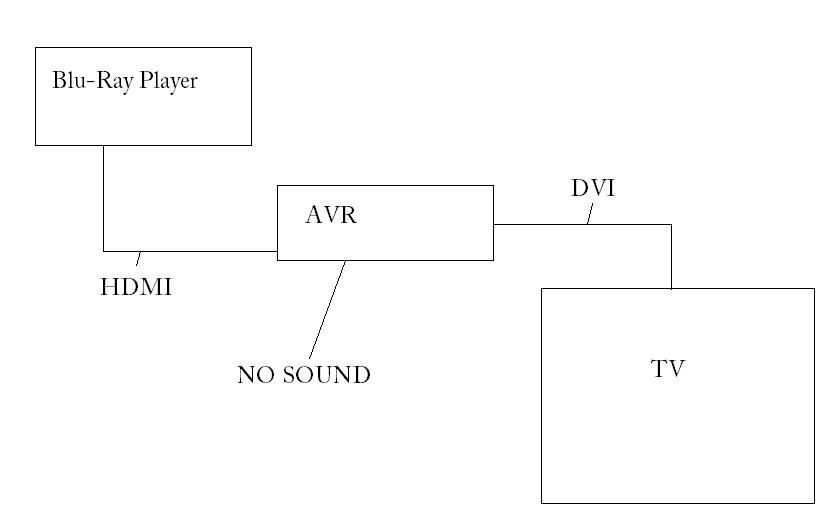
Anyone have an HDMI receiver and DVI television?

AsSiMiLaTeD
Posts: 11,728
As mentioned in THIS thread, I need some help testing something.
--- Setup ---
HDMI cable from source to HDMI input on receiver, and HDMI/DVI cable from HDMI output on receiver to DVI input on TV.
--- Test ---
I need to know if you're getting audio via the HDMI connection to the receiver, so do you get audio on the receiver, obviously no audio is getting to the television.
I know I don't with my AVR and a DVI TV, and I'm trying to determine for sure if it's the technology or the receiver I'm using.
Thanks
--- Setup ---
HDMI cable from source to HDMI input on receiver, and HDMI/DVI cable from HDMI output on receiver to DVI input on TV.
--- Test ---
I need to know if you're getting audio via the HDMI connection to the receiver, so do you get audio on the receiver, obviously no audio is getting to the television.
I know I don't with my AVR and a DVI TV, and I'm trying to determine for sure if it's the technology or the receiver I'm using.
Thanks
Post edited by AsSiMiLaTeD on
Comments
-
AsSiMiLaTeD wrote: »As mentioned in THIS thread, I need some help testing something.
--- Setup ---
HDMI cable from source to HDMI input on receiver, and HDMI/DVI cable from HDMI output on receiver to DVI input on TV.
--- Test ---
I need to know if you're getting audio via the HDMI connection to the receiver, so do you get audio on the receiver, obviously no audio is getting to the television.
I know I don't with my AVR and a DVI TV, and I'm trying to determine for sure if it's the technology or the receiver I'm using.
Thanks
Thats wierd, it should work just fine. What version of HDMI are you using? 1.2 & 1.3a.Home:
Onkyo TX-6500MKII/Polk LSI 9's (A)Polk TSi 100(B)/Polk PSW 10/Onkyo C-S5VL/Technics SL-QD33
Home 2 (Playback):
Dynaudio BM5A MKII/Dynaudio SUB 250MC/Audigy 2 ZS
College:
JBL LSR 2325P/JBL 2310SP/MOTU UltraLite MKIII -
I'm pretty sure it's 1.3
-
Technology is the culprit. DVI (digital video interface) only passes video. Your combo cable is only as good as it's weakest link...the DVI end.
-
What if you don't hook up the TV at all? Thta would kind of take the TV path out of the equation, yes?If you will it, dude, it is no dream.
-
Maybe I'm just not explaining this very well. I'm fully aware that DVI only passes video. I would therefore not expect to be able to plau audio through the TV. However, the cable going to the receiver is HDMI, so one would expect to be able to get audio on the receiver.
If I don't hook up the TV path, then how am I supposed to 'see' what I'm watching? So I have an HDMI cable from my PS3 to the AVR, and then from the AVR to the TV I have the HDMI/DVI cable. If I remove that cable, I DO get sound from the AVR, but then I can't see the movie. I'd like to both see and hear the movie. -
I understand that, I was only suggesting removing the HDMI/DVR cable to the TV as a test, not a solution

So if you DON'T have anything gonig to the TV, you get sound. But in the exact same setup, if you then add the DVI cable from the DVR to the TV, the sound coming out of the AVR goes away? Very strange.If you will it, dude, it is no dream. -
It sounds like it's an issue with your AVR. Is the AVR simply a pass thru or does it do switching? That could be where you're running into the problem.
-
There are people over at AVSforum using other receivers with DVI displays and getting audio from their HDMI sources. I saw that you posted over there in the 819 thread. If nobody there has a solution, I'd bet that you will need a slightly better receiver.
EDIT: Ok, I looked at your owners manual. See page 38, set HDMI to AMP instead of THRU and see what happens. That is the control setting that we were mentioning in the other thread. -
That's exactly it. I also tested with another TV in the house that does have HDMI and the sound is also still there as well - it's only when I connect a DVI component that the sound goes away. I know that's how this unit is supposed to operate because it mentions it in the manual.
The question is, is it a Pioneer thing or the technology? -
Assimilated - You also have to keep in mind that there are different types of DVI connectors, just like VGA. You have to make sure you've got the type that passes audio as well as video.
Or I could be wrong, who knows!"Dr Dunn admitted that his research could also be interpreted as evidence that women are shallower than men. He said: "Let's face it - there's evidence to support it."
My System:Best Buy is for people who don't know any better. Magnolia is for people who don't know any better and have more money to spend.
TV: SAMSUNG UN55B7000 55" 1080p LED HDTV
HTPC: Chromecast w/ Plex Media Server. Media streamed from Media Server. -
AsSiMiLaTeD wrote: »That's exactly it. I also tested with another TV in the house that does have HDMI and the sound is also still there as well - it's only when I connect a DVI component that the sound goes away. I know that's how this unit is supposed to operate because it mentions it in the manual.
The question is, is it a Pioneer thing or the technology?
Did you see my Edit? Make sure HDMI is set to AMP, not THRU! -
DVI does not carry any audio information. only HMDI does.. so it ain't gonna work. end of story.
you then need a digital coax or optical cable to get audio from point A to point B this will handle your audio.
using a HMDI to DVI converter will not get you audio from or to an HDMI input/outputPolkFest 2012, who's going>?
Vancouver, Canada Sept 30th, 2012 - Madonna concert :cheesygrin: -
Yep, it's set to AMP, because I do get audio through the receiver when it's not plugged in or plugged into an HDMI set.
-
AsSiMiLaTeD wrote: »Yep, it's set to AMP, because I do get audio through the receiver when it's not plugged in or plugged into an HDMI set.
Well, it seems that if you want HDMI audio, you either need a new display, or a different receiver. As far as specific models, I can't really say which ones will work, but if you search at AVS, you will find answers. Just go to each major receiver thread and search for DVI. I'm sure there will be some folks who still have DVI displays.
...I'm partial to Onkyo and Denon...
-
Wow, there's alot of misunderstanding of my question and misinformation in this thread. I appreciate the responses though, looks like I'm going to have to either break down and buy a TV with HDMI or try a higher end receiver - either of those means more money which I'm not spending right now so I'll just have to live with my compressed DD and DTS signals for now
-
here is what happen to me. I have a DVI pre amp.. and had a DVI TV.. when I upgraded to a HDMI TV recently.. i had to let the HDMI from my blu ray player go directly to the TV.. and I have component cables from my receiver to my TV on component input 1 so i can see the on screen display from the pre amp. for me.. audio from my blu ray player is handled via analog 5.1 cables.
my cable box had an HDMI cable from it directly to the TV.. and I get audio from a optical cable to the pre amp.
I guess I don't fully understand your question sir.PolkFest 2012, who's going>?
Vancouver, Canada Sept 30th, 2012 - Madonna concert :cheesygrin: -
I suppose I could also look at a Blu Ray player with 5.1 outputs, as I do have 5.1 inputs on this receiver.
-
A few options...use the PS3 with componet, not the best but still very good, buy a standalone BlurRay & use the HDMI/DVI cable for video & 5.1 analog connections for audio. Or upgrade the AVR or buy another TV.
-
-
Buy a new TV dude.
-
I don't have the answer to this and I don't understand why it would work on an HDMI TV and not on a DVI that does pass the video....
But to summarize..the problem is that AUDIO IS PASSED via a blu-ray or HD-box's HDMI when the DVI is NOT connected to the Toshiba Projection TV! But once we hook up the Pioneeer HDMI OUT to the Toshiba DVI in we get a PICTURE but the receiver goes MYSTERIOUSLY SILENT!
This is pretty much a CAPTION for bobman's diagram above!!
I'd say a call to Pioneer is in order...you need to know what kind of AUDIO relationship those HDMI ins and outs haVe for audio and video and whether or not there is some way to SPLIT the signal info, i.e., pass the VIDEO to the TV without losing the SOUND from the AVR.
Is that clear enough....I must say that even I was misreading you in the other thread....and I've never seen a problem like this.....
You might also want to look at your source menus....does the Blu-ray have an option for SPLITTING the audio from the video perhaps....just a guess.
But I think it's Pioneer CS time!
cnhCurrently orbiting Bowie's Blackstar.!
Polk Lsi-7s, Def Tech 8" sub, HK 3490, HK HD 990 (CDP/DAC), AKG Q701s
[sig. changed on a monthly basis as I rotate in and out of my stash] -
This is actually not that uncommon of a problem. HDCP decoding/handshake is done in the final piece of the chain. Which, in this case, is the tv. Since the avr does not get an audio response back from the tv, audio does not get output. Taking the tv out of the chain makes the avr the final pieces and you get audio. Putting an hdmi tv as the final piece, you get an audio and video flag, and you get sound and picture. I'm pretty sure that the HDMI can be implemented in an avr to properly handle this sort of situation so that you get audio, but not all of them are.
Good luck!"The secret of happiness is freedom. The secret of freedom is courage." Thucydides -
why not just run the hdmi from the player to the tv and then run a separate coax from the player to the receiver? sounds easier than beating your head into a brick wall....Ryan Jozwiak
"Because music was meant to be felt and heard"
polkaudio RTiA9
polkaudio RT35i
polkaudio PSW 404
HK 3370
HK FL8380
HK DVD 22
Adcom GFA 5500
Samsung 40" LCD 120 Hz -
AsSiMiLaTeD wrote: »Wow, there's alot of misunderstanding of my question and misinformation in this thread. I appreciate the responses though, looks like I'm going to have to either break down and buy a TV with HDMI or try a higher end receiver - either of those means more money which I'm not spending right now so I'll just have to live with my compressed DD and DTS signals for now
I know exactly what you mean. The same thing happens with my HTPC - if I connect it to a DVI display, the unit does not pass audio digitally. It sees a DVI device somewhere in the chain and cuts the audio portion.
As long as a DVI device is detected, audio is re-routed through the other outputs.polkaudio RT35 Bookshelves
polkaudio 255c-RT Inwalls
polkaudio DSWPro550WI
polkaudio XRT12 XM Tuner
polkaudio RM6750 5.1
Front projection, 2 channel, car audio... life is good! -
Disc Jockey wrote: »This is actually not that uncommon of a problem. HDCP decoding/handshake is done in the final piece of the chain. Which, in this case, is the tv. Since the avr does not get an audio response back from the tv, audio does not get output. Taking the tv out of the chain makes the avr the final pieces and you get audio. Putting an hdmi tv as the final piece, you get an audio and video flag, and you get sound and picture. I'm pretty sure that the HDMI can be implemented in an avr to properly handle this sort of situation so that you get audio, but not all of them are.
Good luck!
You got it. As long as there is a DVI device somewhere in the chain, the audio portion of HDMI does not get output.polkaudio RT35 Bookshelves
polkaudio 255c-RT Inwalls
polkaudio DSWPro550WI
polkaudio XRT12 XM Tuner
polkaudio RM6750 5.1
Front projection, 2 channel, car audio... life is good! -
Sounds like you've tried all the potential workarounds...
A cheaper solution... can you run component monitor out to your display? I doubt you'd see any PQ difference. It's just a matter of your receiver 'downconverting' from HDMI to Component.
Otherwise, as RyanJoz suggested... run Hdmi/Dvi from Ps3 to TV, (but correction...) OPTICAL out from Ps3 to AVR. -
dane_peterson wrote: »Sounds like you've tried all the potential workarounds...
A cheaper solution... can you run component monitor out to your display? I doubt you'd see any PQ difference. It's just a matter of your receiver 'downconverting' from HDMI to Component.
Otherwise, as RyanJoz suggested... run Hdmi/Dvi from Ps3 to TV, (but correction...) OPTICAL out from Ps3 to AVR.
Problem there is that you don't get HD-sound through the digital connection.
I have a Toshiba HDTV RPTV myself...but mine has one HDMI version 1.1. It was the first Toshiba series to have an HDMI and does not have handshake HTCP problems.
If your set is a previous model (and I must say they have a beautiful picture)...the set can only process 1080i from any source including Blu-ray...so if you had a PLAYER that would allow you to send out Video through component outs and split the audio signal to allow it to still go the receiver HDMI in, and not OUT you would be OK. I find no real difference between my component 1080i and the HDMI 1080i on my picture on the Toshiba!)
Somehow, though, I doubt most BDPs would allow that.
cnhCurrently orbiting Bowie's Blackstar.!
Polk Lsi-7s, Def Tech 8" sub, HK 3490, HK HD 990 (CDP/DAC), AKG Q701s
[sig. changed on a monthly basis as I rotate in and out of my stash]